Deck Import
Deck import lets you quickly populate your decklist from external sources — either by pasting formatted text or importing directly from supported deck-building sites.
Whether you're copying a tournament-winning list from MTG Top 8, importing your latest brew from Moxfield, or pasting a decklist from a Discord message, the import system automatically organizes cards into the correct sections and detects the appropriate format.
Import dialog
Click the Import decklist button in the deck builder section to open the import dialog. The dialog provides two import methods via tabs: Import from URL and Paste text.
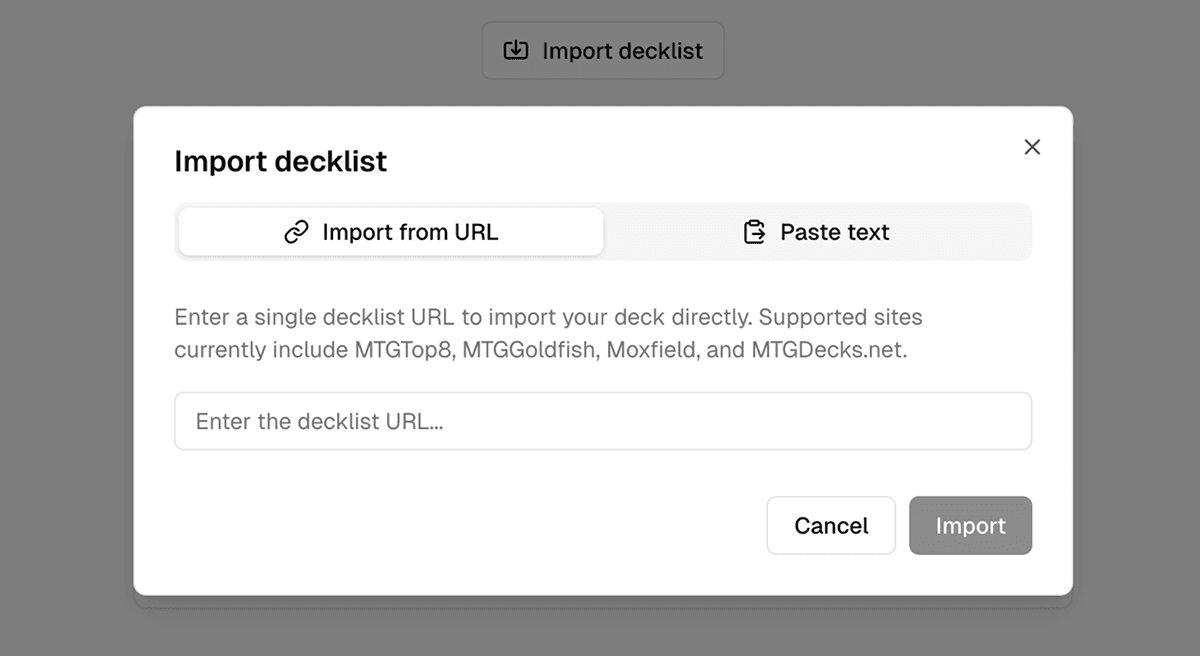
Import from URL
The Import from URL tab (default) allows you to import decklists directly from supported deck-building sites by pasting a deck URL. Supported sites currently include:
Simply paste a deck URL into the input field and click Import. The app will:
- Extract the complete decklist from the URL.
- Organize cards into mainboard, sideboard, and commander sections.
- Detect the format automatically (if available).
- Populate deck name and player name metadata (when provided by the source).
Paste text
The Paste text tab allows you to directly paste decklists from any source. This method is flexible and supports various common decklist formats, such as Magic Online and Arena.
Supported formats
The paste parser accepts multiple quantity formats. Each card should appear on its own line with the quantity first, followed by the card name:
4 Lightning Bolt
4x Lightning Bolt4: Lightning Bolt
Lightning Bolt x4
Lightning Bolt 4Section headers
The decklist can be organized into sections using headers. Section headers are case-insensitive and optional. If no header is provided, cards are added to the mainboard by default.
| Section | Accepted headers |
|---|---|
| Mainboard | DeckDeck:Main DeckMain Deck:MaindeckMaindeck:MainboardMainboard: |
| Sideboard | SideboardSideboard:Side BoardSide Board:SBSB: |
| Commander | CommanderCommander:CommandersCommanders:EDHEDH: |
| Companion | CompanionCompanion: |
Tip: Companion cards are automatically added to the top of the sideboard section.
Format detection
The import system automatically detects the deck format based on the presence of section headers:
- If a Commander section is found, the format is set to Commander.
- If only mainboard and sideboard sections are found, the format defaults to Standard.
You can always change the format after importing using the format selector in the deck builder.
Examples
4 Lightning Bolt
4 Lava Spike
4 Rift Bolt
4 Skewer the Critics
20 Mountain

Sideboard
3 Smash to Smithereens
2 Searing Blood
Commander
1 Atraxa, Praetors' Voice
Deck
1 Sol Ring
1 Command Tower
1 Arcane Signet
96 Forest4x Lightning Bolt
4x Lava Spike
4x Smash to Smithereens
2x Searing BloodManual entry
You can also skip the import dialog entirely and type decklists directly into the deck builder text areas. The same format rules apply as the Paste text import method.
Each text area (Main Deck, Sideboard, Commander) accepts cards in the quantity cardname format. Use one card per line, and the builder will validate your entries in real-time.
Metadata filtering
When importing from sources that include metadata (like Moxfield exports), the import parser automatically filters out metadata sections. Any content after an About header is ignored until the next empty line.
This means you can paste complete exports from deck-building sites without manually cleaning up metadata — the parser handles it for you.